Candy AI languages: French, German, Spanish and what else works
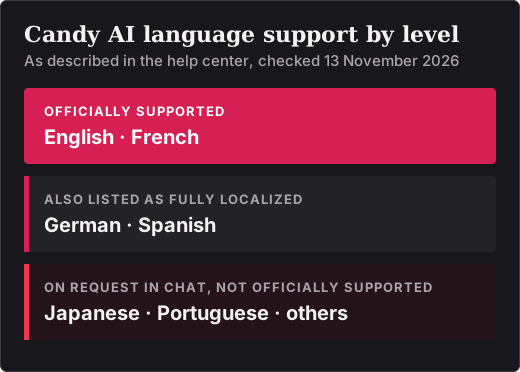
Candy AI’s interface is available in English and French, and its help center also lists German and Spanish as fully localized, as checked on 13 November 2026. Other languages, including Japanese and Portuguese, can be requested in chat but are described as not officially supported. A switch takes effect only in conversations started afterwards, so an existing chat has to be reset first.
Key points
- Official interface languages are English and French; one help article also lists German and Spanish.
- The language is changed with the flag icon at the bottom of the left sidebar.
- An existing chat keeps its old language until it is reset, and a reset clears that chat’s memory.
- Japanese, Portuguese and other languages work on request only, with uneven quality.
- Three habits keep a character in your language: instruct it at the start, write only in that language, and correct it when it slips.
Which languages are supported
| Language | Status in the help center | What to expect |
|---|---|---|
| English | Officially supported | Interface and chat |
| French | Officially supported | Interface and chat |
| German | Listed as fully localized | Interface and chat; confirm in the language menu |
| Spanish | Listed as fully localized | Interface and chat; confirm in the language menu |
| Japanese | Not officially supported | Chat on request; quality can be inconsistent |
| Portuguese | Not officially supported | Chat on request; quality can be inconsistent |
| Other languages | Not officially supported | May work if you ask in chat |
Two different things are being described. The site language covers menus and buttons. The chat language is what a character writes, and it follows the site language only in a conversation started after the switch.
The help center is not fully consistent. It says English and French are the officially supported languages, while another of its articles lists full localization for English, French, German and Spanish. We report both statements as they stand. If you need German or Spanish, check the language menu on Candy AI before subscribing.
How to change the language
- If you have already talked to the character, reset that conversation.
- Open the flag or language icon at the bottom of the left sidebar.
- Choose your language.
- Start a new conversation with the character.
With a character you have never talked to, the first step is not needed: choose the language, then start the chat.
Why an existing chat keeps its old language
Switching the language affects only conversations started afterwards. Chats that already exist carry on in the language they began in until they are reset.
A reset has a cost. Resetting or deleting a chat also clears that chat’s memory, and a deleted conversation cannot be recovered. If the conversation matters to you, copy what you want to keep before you reset it.
Keeping a character in your language
Even in a supported language, a character can slip back into English. The help center’s advice comes down to three habits:
- Open with an instruction. Make your first message a request to answer only in your language.
- Write every message in that language, including the short ones.
- Correct the character when it switches, by repeating the instruction.
In French you might open with « Réponds-moi toujours en français, s’il te plaît. », in German with „Schreib mir bitte nur auf Deutsch.“ and in Spanish with «Contéstame siempre en español, por favor.» These are our own examples. Any clear instruction does the same job.
Japanese, Portuguese and other languages
For languages without official support, the method is simply to ask the character in chat to use that language. The help center covers Japanese and Portuguese in this way and is open about the limits: quality can be inconsistent, and long conversations may drift back into English. The three habits above matter even more here, and you should expect to repeat the instruction.
What the documentation leaves open
Several things are not stated in the pages we read: which languages voice messages and voice calls support, whether image prompts work equally well in every language, and whether support replies in languages other than English. The help center we consulted is the English edition, and prices are shown in US dollars. If one of these points decides the matter for you, ask Candy AI support before paying.
Testing your language before you pay
The free account allows five messages, which is enough to see whether a character answers in your language and keeps to it for a few turns. It is not enough to show drift in a long conversation. Our Candy AI free plan guide explains the allowance.
If the language works badly for you after you have paid, remember how narrow the refund terms are: the request has to be sent within 24 hours of the payment, and no more than 20 tokens may have been used. Text chat uses no tokens, so a first day spent testing conversation alone does not eat into that limit. Whether a refund is granted is for Candy AI support to decide.
If you subscribe to test further, the 1-month plan limits what you risk. See Candy AI pricing for the figures, and read how to cancel a Candy AI subscription before you pay.
The language menu is at the bottom of the left sidebar on Candy AI. Affiliate link to Candy AI.
Open Candy AISources
Pages published by Candy AI and used for this article, each read on 13 November 2026.
- Can the AI speak in other languages besides English?
- Can Candy.ai be used in Japanese or French?
- Is Portuguese translation available?
- How can I change the language to French when chatting with my AI?
- How can I change the language to German when chatting with my AI?
- How can I change the language to Spanish when chatting with my AI?
- How can I change the language to Japanese when chatting with my AI?
- How can I change the language to Portuguese when chatting with my AI?
- Can I recover accidentally deleted conversations?
- What can I do as a free user?
- Am I eligible for a refund?
- I already have an active subscription. Why am I being asked to purchase additional tokens?