How to cancel a Candy AI subscription and request a refund
To cancel Candy AI, log in, open My Profile, go to Settings and use the Unsubscribe button beside your subscription details at the bottom of the page. Canceling stops future renewals but does not return the payment already made: a refund is a separate request to support@candymail.ai, and it has to be sent within 24 hours of the payment. Your Premium access continues until the end of the period you paid for.
Key points
- Cancel under My Profile, Settings, Unsubscribe. Access runs to the end of the paid period.
- Canceling is not a refund. A refund is a separate email to support, sent within 24 hours of the payment.
- A refund needs four conditions: the 24-hour window, no more than 20 tokens used, a direct card payment, and a problem not caused by your own device or connection.
- After canceling you keep your chats, images, characters and token balance for as long as the account exists.
- A subscription cannot be paused, only canceled.
How to cancel, step by step
- Sign in to Candy AI in your browser.
- Open the My Profile menu.
- Choose Settings.
- Scroll to the foot of the Settings page, where the subscription details are listed.
- Press the Unsubscribe button and confirm when asked.
That is the whole procedure as the help center describes it. It is done inside your own account. This guide is independent and cannot cancel for you.
If you cannot log in, the help center suggests clearing the browser’s cache and cookies, using “Forgot Password” on the login page and checking the spam folder for the reset email, trying another browser or device, checking for typos, and updating the browser.
Canceling is done inside your Candy AI account, under Settings. Affiliate link to Candy AI.
Open Candy AICanceling and refunding are different things
| Aspect | Canceling | Requesting a refund |
|---|---|---|
| What it does | Stops future renewals | Asks for a payment already made to be returned |
| Where | Settings, Unsubscribe button | Email to support@ |
| Deadline | Any time before the next renewal | Within 24 hours of the payment |
| Result | Premium continues to the end of the paid period | Reviewed by Candy AI support |
Pressing Unsubscribe during the first 24 hours is not, in itself, a refund request. If you cancel and do nothing else, the payment stays with Candy AI and you keep Premium until the period ends.
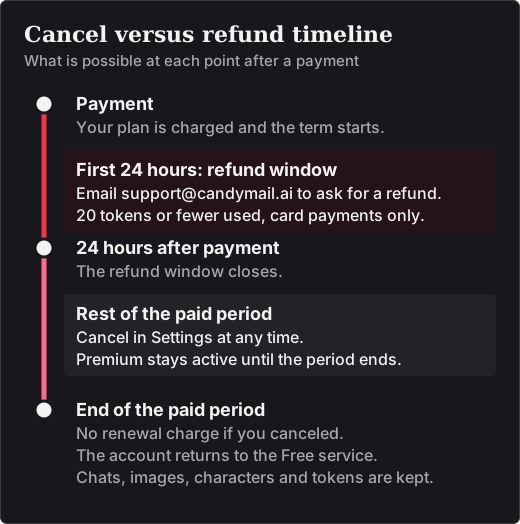
The four refund conditions
A refund request is only eligible if all four of these hold, according to the help center and section 10.4 of the Terms of Service:
- It is sent within 24 hours of the payment.
- No more than 20 tokens have been used on the account.
- The subscription was paid directly by debit or credit card.
- The problem is not one caused by your own device or internet connection.
To make a request, email support@candymail.ai inside the 24 hours. It makes sense to quote the email address of your Candy AI account and to say plainly that you want a refund, not only a cancellation. Candy AI then decides whether the request qualifies. We found no published reply time, so we cannot tell you how long an answer takes.
Two practical consequences follow. A plan paid with cryptocurrency or bank transfer falls outside the policy as written; for Apple Pay or Google Pay, ask support before relying on it. And since tokens are spent on images, voice and video, heavy use of those features on the first day can put a refund out of reach. The help center does not say how many tokens each one uses.
What you keep after canceling
- Premium access until the end of the period you paid for.
- Your chats, images, characters and history, for as long as the account exists.
- Your token balance. It is hidden while the account is on the Free service and usable again if you re-subscribe.
What ends with the paid period is the use of Premium features. More on the balance is on our page about how Candy AI tokens work.
Why you cannot pause
Candy AI has no pause option: a subscription is either active or canceled. The nearest equivalent is to cancel and subscribe again later. Your content and tokens wait on the account in the meantime. What is not guaranteed is the price, since a new subscription is charged at whatever the plan page shows on that day. Current figures are on our Candy AI pricing page.
Deleting the account instead
Deleting the account is a different and permanent step. In My Profile, open Settings, find the “Danger Zone” and choose “Delete Account”. This also cancels the subscription. Unlike canceling, it removes your content, and deleted conversations cannot be recovered. Candy AI says it keeps some data for legally required periods, as set out in its Privacy Notice.
Stopping charges: what works and what does not
Removing your card is not a way to cancel. While a subscription is active, at least one payment method must stay on file. The reliable route is the Unsubscribe button, followed by a check of your statement, where Candy AI charges appear as “EverAI”. If a charge arrives after you canceled, write to support with the email address of the account. For the company behind the charge, see who operates Candy AI and how billing appears.
Sources
Pages published by Candy AI and used for this article, each read on 13 November 2026.
- How do I cancel my subscription?
- Does Canceling My Subscription Automatically Give Me a Refund?
- Am I eligible for a refund?
- I already canceled my subscription, where is my refund?
- Can I pause my subscription?
- Do I lose my content and tokens after I cancel my subscription and my account goes back to the Free service?
- How can I delete my account with you?
- How can I remove my payment method?
- What’s the charge in the billing statement?
- I can’t login to my Candy account, what can I do?
- Candy AI Terms of Service